Saturday, October 12, 2013

Resource Discovery!

Hey friends!   I was doin' my usual TPT shopping last week and ran across an awesome new seller that I have to share with you.  I instantly fell in love with her design styles! (Oh, how I love me some chevron!!!)  Before I knew it, my cart was full!   LOL  Check out some of her super cute, and super useful resources.  The goal of my blog is always to share great resources I find with other kinder-teachers... and this one is a gem! 


Check her out!

       
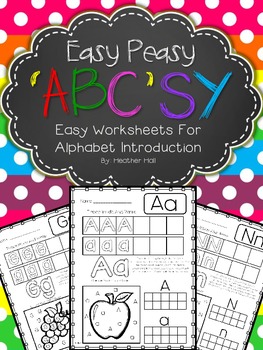
Color Word Posters - Tinted Chevron BackgroundEasy Peasy 'ABC'SY ~ Easy Worksheets For Alphabet Introduction
 
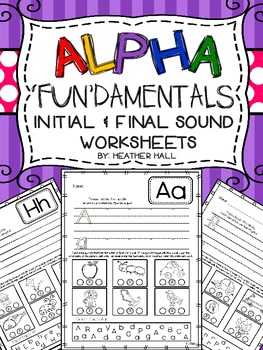
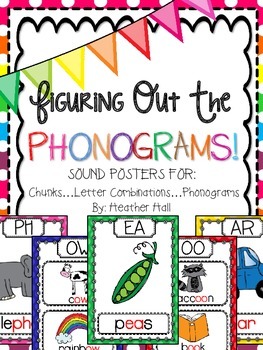
Alpha 'Fun'damentals! {Initial & Final Sound Alphabet Worksheets}Posters For Chunks - Letter Combinations - Phonograms  
 
 
Just to fill ya in...
I emailed this talented resource designer to ask if I would do a little bloggin' about her and she was just the sweetest thing!   She does not have a blog herself... but she can be found on TPT. 
Click on any of the pics above to be directly link to "Resources Designed with the Littles in Mind!"
 
If you'd like to take a closer peek at my week INSIDE the walls of my classroom, hop on over to my class blog at www.kidblog.org/mrsehleskindergartenclass.   Log in on the drop down menu as "guest".... and use the password "guest" to enter.  My adventures are updated weekly!


Saturday, October 5, 2013

Owl Art!

I hope you had a chance to view my owl adventure slide show in my last post.   If you haven't....I really do think it would be worth your time to take a peek!   It's filled with some fun ideas for fall...and learning about owls.  :)   One thing I did NOT include in the slideshow was the final product of our owl art project.   (In the slideshow, you can sneak a peek at the kiddos in action as they work on the project....but it doesn't show the completed version.)  When I posted them in the hallway this week, I was shocked at the number of class-stopping interruptions I got!  I mean staff and parents literally walking into my room and interrupting instruction just to tell me how much they LOVED them!   AWWW!  It made me feel so good!   And the kinder-kiddos felt so special and talented.   :)

So, I thought they may be worth posting for you!  Take a peek! 


I was inspired to create this project by combining a couple different ideas I had found on Pinterest.  I took the different parts I liked from both...added a little of my own creativity... and Wa-La!
 
The first step in this project was giving each student a black sheet of construction paper.  I used the standard "large" size (12 x 18)... but then trimmed an inch of the sides because I knew I would want to "matte" them on a 12 X 18 fall color at the end.   I passed out brown paper and had the kids cut out a simple branch shape.  Next, I passed out a small piece of yellow paper upon which I had drawn a circle.  The kids cut out the circles for their "moons."  They glued those on and then were invited to Q-Tip paint on ten stars as many stars as they chose.  (LOL!  I really did tell them 10...but obviously many were so engrossed in painting that they forgot to count!) We set those aside to dry.
 
Next, I gave each kiddo a white piece of paper. Then I led them through basic directed-drawing instructions to draw an owl.  (I just made them up!  I started with an oval shape for the body, then circles for the eyes, etc.) They used PENCIL first....then when finished, traced their pencil marks with back Sharpies.  After that, I TAUGHT THEM how to correctly use watercolor paints as I painted an example.   Then the kiddos painted their own. We cut them out carefully, and added them on to the backgrounds by gluing. Then I "matted" them onto a fall colored paper to make them pop.
 
What I love the most is the way that each child's owl drawing totally gives each owl his own "personality!"    They are just adorable, aren't they?  The kiddos did a GREAT job! 
 
The first grade teacher next door told my class that she loved them so much she hoped we left them up all year and just added accessories...like a Santa hat, a leprechaun hat, Easter bunny ears, etc.   Hee! Hee!   (At least if I get too busy to change my hall bulletin board I've got options!  LOL)
 
 
Blessings to you!
 

Friday, October 4, 2013

WHOOO Loves Kindergarten?

Whooo loves kindergarten?   
I do!  I do!  Teaching kindergarten gives me so many opportunities to be creative and  just a little bit crazy! As most of you know, "Dr. Science" comes into my classroom regularly to teach my kinder-kiddos about science.   ("Dr. Science" is one of my very best friends and co-teachers who dresses up like a mad scientist and helps me carry out my science lessons.  She is crazy!  She tucks in her upper lip, busts out her lab coat and kicks the learning level up a notch whenever she gallops into the room!)  This week our science studies focused on learning about OWLS.
 
Take a peek at some of our owl fun... and few other peeks from last week! 


Click to play this Smilebox slideshow
Create your own slideshow - Powered by Smilebox
Create your own free slideshow design

Sunday, September 15, 2013

Classroom Bloggin'!

Oh my blueberries!!!  Where does time go?  I can NOT believe how long it's been since I've posted.  I do apologize...but I know that at the same time, many of you can relate!  I used to beat myself up when I skipped a week (or two!) between new posts...but now I have come to accept that sometimes life "happens" and you just can't be Wonder Woman every day, in every way!  So I'm settling for the occasional superhero status.  LOL. 

Even though I have been less-than-prompt on keeping up with my teacher-blog... I have done fairly well on my newest blogging adventure of having a CLASS BLOG.   For the past few years I have wanted to set up a classroom blog for students and parents.  I envisioned a place where parents could SECURELY log-in, with no fear of being at the mercy of public "creepers," to view what their kinder-babies are up to every week.   Until this year, I struggled with finding the right blog host.  I like the Shutterfly class blog set up...but my principal was NOT a fan of the regular advertisements and emails that parents were sent if you had a class blog with them.  So I continued to search.    This summer I found KID BLOG... and have been VERY pleased with it! 

Kid Blog allows YOU to choose your own security options.  You can leave it wide open to any visitor...or lock it up like Fort Knox, so only listed users with passwords can enter and view it.  My administration lovingly approved it!  YAY! It's also very easy to use.  Oh...and it's FREE!  You can post text, pictures, videos, anything!  The only slight downside I see is that currently you can not design your own background and graphic templates.  However, that is something they are working on!  It should be available soon.  Until then...you can choose from about 15 templates/color combinations.  

I could go on and on listing the details of Kid Blog, but if you like me you'd rather just SEE it and explore it yourself.   So...I'm going to give you my own classroom blog site info and let you login and do some snooping!   (Note: My school is one of those schools who likes to keep things rather secure and "unsearchable" to the public as a whole, so I have set up my blog to require you to log-in and enter a password.  Sharing this resource with other colleagues IS permitted, however!  So go explore...just please do not post these access codes on other public sites.)


Link:   http://kidblog.org/mrsehleskindergartenclass

Log-in: Guest (found in the drop down log-in menu)

Password:   Guest

(This login and password will expire November 1, 2013.  If you desire access after that date, email me or post a comment and I will send you updated info.)


Here are a few screen shots from my class blog, just to give you a peek!


Wednesday, August 7, 2013

Celebrate Student Birthdays In Style!

Since I STILL can NOT get into my classroom yet, I decided to check off another item on my long, long list of "to-dos."  {In case you have not heard, my building is under-going a summer renovation.  While I am so grateful for the upgrades...I am freaking out that I still am unable to even set foot in my classroom!   The "word on the street" is that I may be able to get in to my room on the 12th.  Guess what day my kinder-kiddos arrive for their k-assessments?   August 13th!!  That's 24 hours to prepare folks!  Can you say "All-Nighter?"  I'm thinkin' I gotta do a 24 hour picture post on what happens that night! You can watch me go CrAzY get prepared in a photo timeline! PRAY FOR ME, People!}

Tonight I knocked out a new classroom birthday celebration kit.  I gotta say... I do love it.  It's full of what I love most... happy celebration and chevron!   :) Here is a peek at what is inside:


I'm really excited about this kit because I truly feel like it is something that EVERY teacher needs....but rarely finds time to do his or herself!  

So... if you are looking for a super easy, yet very classy way to celebrate your students' birthdays, I hope I can help you with this kit.   I gotta say... I not only think it's cute {Chevron Love!  Chevron Love!}, but it truly is meaningful.  The "Happy Birthday Book" is the core of this kit.   When celebrating a student's birthday, all of his classmates are invited to complete a "My wish for you..." page.   Classmates illustrate a picture and can either write in the text for their birthday wish/gift...or the teacher can write the text as the child dictates the wish from his/her illustration.   All classmates' pages are then compiled into a class book, complete with a beautiful cover (which can be customized thanks to it's edit-able nature!), and then sent home with the birthday child as his class gift!  

Check out just one of the style options of "Birthday Books" below!


Parents TREASURE these books!  I've used them for a few years and let me tell you...they are a HIT!

There are many other items included with which you can complete your students' birthday celebrations, including:

* Student Birthday Book
* Happy Birthday Certificates
* Student Birthday Badges
* Birthday Goodie Bag Toppers
* Student Desk/Table Birthday Decor
* Happy Birthday Seat Signs


I hope you will take a minute to pop over to my TPT store {click here} and check out my lastest kit!  
I think it will be worth your while!  

Email me if you have any suggestions for this packet!   


Tuesday, August 6, 2013

New Tech Tool: Educreations

I have received several emails regarding my "digital portfolio" post... along with requests for the next techie-tidbit I promised.  I love ya'll so much that I'm going to stay up late on this glorious second day of a killer migraine to complete this post!   (Don't underestimate the power of  "blogger-love!")

As you know, one of my techie goals this year is to create and use digital portfolios in my classroom. After much research and advice from my techie mentor, Lori Elliott, I decided KidBlog was the best option for me to accomplish this.  {Click here to read my tutorial post about how to set up your own KidBlog account.   KidBlog can be used as a classroom AND student blog... as well as a class blog which contains student "portfolios" where all kinds of digital media can be posted, stored and shared with parents!)  

If digital portfolios are on your professional goal list for the year and you have followed the directions on my previous blog post to set up your own classroom KidBlog home page, you may be asking "What do I do next?"  

Well, here is the answer.....

Check out Educreations.com! 

Educreations is a program that turns your computer or iPad into a recordable interactive whiteboard that captures your voice {or your students' voices!} and handwriting to produce amazing video lessons that you can share online. Students and parents (and anyone else you grant access) can replay your lessons in any web browser, or from within our app on their iPads or iPhones. Check out the "Showcase" on the Educreations homepage or the "Featured" tab in our iPad app to view some great lessons that other teachers have created with Educreations.


Imagine....
Little Jenny has just demonstrated mastery of one of the common core standards with which she has been struggling.  Let's pretend it is a math standard on patterning.  You want to document her progress and help celebrate this goal.  You call Jenny over to your table and have her sit down with the iPad.  (You can use a computer too!)   You go to your Educreations app or computer program and create a new "lesson."   You press the "record" button so that your conversation will be recorded.   You then ask Jenny to watch you as you draw a pattern of red and blue circles on the screen, creating an AB pattern.   You stop after 7 shapes and ask Jenny what should come next.   She answers correctly.  Then you ask Jenny to create her own pattern using the different colors provided. You ask her to explain what she is doing as she goes.   She does a beautiful job explaining her work and her understanding of what a pattern is.    You hit the button to stop recording... then using the tools provided right there on the app/program you send off the digital video clip to mom and dad via email... and then you import the digital video into Jenny's digital portfolio folder on your KidBlog page!  This video joins 10 others you have created on Jenny's learning progress, perhaps including videos of her practicing reading fluency... or describing an imported photo of the landforms you are studying in social studies!  :)  

Click on the pic below to see an example!  {I made this sample myself,  People.   Put your imagination caps on... and enjoy my goofy voices!}


Sound good?   Sound GREAT?   
Your principal will think you are a...
TEACHING ROCKSTAR!!!

If you are ready to dive in, follow this simple steps:

1. Go to educreations.com
2. Click on the green "Sign up here" button. (See below.)

3. Choose the "Teacher" option. (See below.)

4. Fill out a few basic info questions and hit "sign up!" (No picture for this one. It's easy.  Trust me.)

5. You will automatically be sent to your new "dashboard." (See below. Note that mine has a few things in it already because I've been playing around with things!)

6.  To begin, hit "create a course" on the left hand side of the page.  (See pic above.)

7. This is what you will see!

8. Fill out the page to create a new "course."   Think of a course as a big folder that you will put your digital videos inside.  To begin with, I just named mine "Mrs. Ehle's Kindergarten Class."   I plan to just save everything "under" this course name to begin with.   If I see that I start creating so many educreations videos that I need to start creating subfolders like reading, math, etc.  then I will do that when the time comes!   I'm keepin' it simple to start with!

Hit "create" at the bottom when you have filled in your course info.

9. You will be taken back to your "dashboard" and you will now see your new "course" (I like to think of it as a folder) on the left hand side of the dashboard.   You will see this:

10. Now the FUN Begins!!! Click on "Create new lesson." (See above.)

Time to play around a bit!  
Here are a few simple tips to get you started...
* Click on the black, blue, red and green color squares at the top of the page to change the color of your "pen."  {Your "pen" is your finger or stylus if you are using an iPad...or your mouse if you are using a computer!}

* Hit the "Record" tab with the red button at the top right in the tool bar to record you or your students speaking.

* If you would like to import a picture to use, simply click on the picture icon in the bottom tool bar.

* The eraser is for erasing...and the trash can icon at the bottom is for deleting.  Imagine that!

* If you want to make a digital video with more than one "page," simply click on the arrows to turn and start a new page.

This is SUPER simple, friends!    
Just play around....and imagine the possibilities!

If you have ANY questions...ask me!   
OR...
Check out the Educreations FAQ page!


How do you think you can use Educreations in your classroom?
Share your ideas in a comment!


{P.S.  I GOTTA find a way to make "tutorial-type" posts cute!  This post was chock-full of info...but lacked some serious visual appeal!}


Friday, August 2, 2013

One of my FAV "go-to" WoRd WoRk" resources! Check this out!

Howdy, B2S Buddies!  I don't call my blog "Mrs. Ehle's Kindergarten Connections" for NUTHIN"!  I will be the first one to admit I do NOT have all the magical teaching answers at my fingertips... but I do know some of the BEST teacher-blogger-creators out there!   Whenever I find a resource that I have personally used and LOVED... I feel obligated to share it with you.   {Please note that any resource or product that I post about is ALWAYS done because I TRULY love it... and never because someone has "paid" me to post it!}  The resource below is one that I used EVERY WEEK in my classroom last year.  It was one of my absolute "go-to" resources every week in independent "word work" center rotations.  The best part is that no matter what "sight word" list or system you use... this resource can support it!  I printed off the masters, popped them into page protectors and filed them alphabetically in a binder.  Each week when I focused on new sight words, I just pulled out the word sheets that worked with my teaching order.   PER-FECT for everyone!   And this deal can NOT be beat!  The entire HUGE set is on sale now for 74% off!   CRAZY!!!  Here are the details:

74% Off on SIGHT WORD PRACTICE SET from Teaching in Blue Jeans 
You save $23.01


[Image: SIGHT WORD PRACTICE SET]
Sight Words – one of the underlying foundations to reading and writing.  A solid understanding and mastery of these most frequently used words in the English language help a child not only begin to read those first books, but also develop fluency and automaticity in their reading.  This in turn leads to comprehension which is the goal of reading – deriving meaning from words.  However, sight words are also some of the most difficult to learn because many do not follow the typical phonics patterns.   This set is designed to make the practice and review of sight words fun and engaging for the child.
Who is it for?
  • Recommended ages 4-10 / Pre-K – 3rd grade
  • Teachers and homeschooling parents who want a multi-sensory approach to practicing sight words
  • Parents who want to help their child get ahead in reading
  • Parents of a struggling reader looking for a multi-sensory approach to learning, reviewing and practicing sight words
What is included?  In this deal you will receive the following products focused on sight word instruction and review:
  1.  Multi-Sensory Sight Word Practice Pages for the complete list of 220 Dolch Sight Words.  Each page includes a section to read it, trace it, write it, rainbow write it, find it and build it.  Perfect for whole group instruction, independent practice, or as part of a learning center rotation.  These pages are divided according to the Dolch word list which makes it easy to differentiate for students at different levels.
  2. Multi-Sensory Sight Word Practice Pages for the common color words (black, blue, brown, gray, green, orange, pink, purple, red, white, yellow)
  3. Multi-Sensory Sight Word Practice Pages for the number words from zero to ten
  4. Sight Word Sticker Book for a fun and motivating way to encourage kids to learn and practice their sight words.  When words are fluently read, the child earns a sticker next to the word.  This set includes pages for the alphabet (to practice letter names and sounds), color words, number words, and 150 of the most common sight words.  Choose from four different cover options.  Also includes a progress monitoring data sheet for all the pages in the sticker book.
sight word   sticker book
Look like something you may be interested in? 
This deal is offered for a few days only from Educents.  The website is super easy to navigate through and the daily e-mails keep me up to date of the latest and greatest offerings.  Like Groupon, each deal is only good for a set amount of time - but you can always find out how much time is left on the educents page.  The explanations are great, honest and straight forward.  I have yet to find something that is "talked up" but doesn't meet my expectations.  If you haven't tried educents yet, then I have a deal for you!  Click the picture below and sign-up for the daily e-mails.  By doing so you will get a $5 credit to use as you wish on Educents!  


  Who is the sassy, smart teacher-creator behind this

 favorite product of mine? 

teaching in blue jeans logo 
Well, she is one of my "blogging besties."  I loved her blog and used her resources LONG before I met her.... but had the awesome pleasure of spending the week with her in Vegas this summer at "I Teach K."  I'm tellin' ya, friends... She is THE BEST!  
Amy Biddison is the teacher behind Teaching in Blue Jeans.  Although she doesn’t teach in blue jeans every day, her “Blue Jean” Mentality is one she carries into her classroom.  Amy’s goal is to create a classroom where her students are comfortable and safe, willing to take risks and try new things, and most importantly where learning is fun!  Amy has taught 6th, 7th and 8th grade reading intervention, 3rd grade and most recently, kindergarten.  You can find out more by visiting Teaching in Blue Jeans.
Looking for a great sight-word resource this year?    THIS is it!   
Go getcha-some!